

Tiger stripes or fine scratches on your
Anilox
Do you see streaks or "scratches" that reappear in solid areas or where ink coverage is heavy? First, rule out contamination. Targeted manual cleaning can often quickly restore print quality and prevent unnecessary downtime.
How do you recognize Tiger Stripes?
Tiger stripes appear as fine, parallel lines or scratches on the anilox surface. They are often more visible under oblique lighting or in areas with high ink coverage. The pattern stands out even more when cleaned areas contrast with areas that are still contaminated. What may seem minor can quickly lead to disruptions in ink transfer, print quality, and process stability.
* Identify the pattern and the cause
* Restore stable ink transfer
* Prevent recurrence through inspection and maintenance
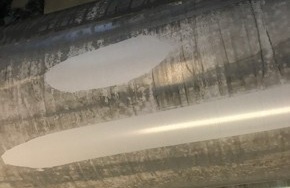
The striped pattern is clearly visible in the photo: the cleaned areas (two wide stripes) stand out against the still-soiled spots, making the contrast really stand out.
Quick Diagnosis
Recognition
Fine, parallel lines on the anilox roller; particularly visible under raking light or with high ink coverage.
Cause
Contact between the doctor blade and the anilox roller due to pressure, misalignment, or debris; also buildup of resins, paper dust, or binders.
First step
Perform a thorough manual cleaning. If streaks remain visible: inspect the chamber and blades for wear, misalignment, and hard debris.
How do tiger stripes form?
Tiger stripes are primarily caused by contact between the doctor blade and the anilox roller. Incorrect blade pressure or misalignment, trapped debris or hard particles behind the blade, and accumulated contamination (dried ink, resins, paper dust, binders) cause localized friction and scoring. This results in uneven ink transfer.
Approach: cleaning + inspection
1) Cleaning (manual)
Perform targeted manual cleaning using Anilox Aftercare to remove residual contamination and distinguish between contamination and physical damage.
2) Diagnosis after cleaning
Are the lines still visible after cleaning? This usually indicates a mechanical issue. Inspect the chamber squeegee and doctor blades for wear, misalignment, and hard debris behind the blade.
3) Recurring Tiger Stripes
Is the problem recurring? Check the blade pressure and machine settings, thoroughly clean the blade chamber, and ensure there is no debris between the blade and the roller.

Application Anilox Aftercare
Anilox Aftercare is a specialized cleaner designed for periodic manual cleaning. Use with a suitable Flexoclean power sponge or pad.
- Apply Flexoclean Anilox Aftercare directly to the affected area using the Flexoclean power sponge.
- Allow the Anilox After Care to sit for 10 to 15 minutes, then treat the roller again with the Power Sponge.
- Rinse thoroughly with clean water.
- Dry with a clean, dry cloth.
- Always wear the appropriate personal protective equipment (PPE).
The result?
Visible improvement after targeted manual cleaning.
Are there any streaks left behind? This may indicate physical damage rather than dirt.
Before treatment:
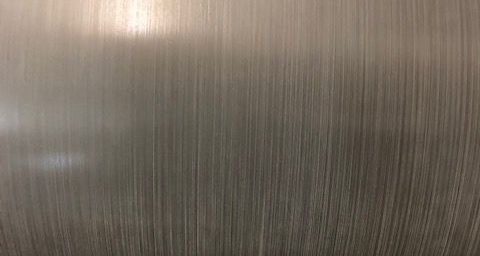
After treatment:

Do tiger stripes keep coming back?
When tiger stripes reappear after proper cleaning, the cause is almost always related to the leaf arrangement:
- Check the doctor blade for wear and misalignment.
- Check the sheet pressure and machine settings.
- Thoroughly clean the blade chamber to remove dried ink or hardened deposits.
Preventive maintenance of both the anilox roller and the doctor blade system is crucial to preventing recurring printing defects and unplanned downtime.
What if you do nothing?
Then you get:
- Visible streaks in the print image
- Higher rejection rates
- Accelerated wear of anilox rolls
A structured approach to cleaning and inspection is therefore not an expense, but an investment in process stability, product quality, and asset protection.
Practical tip
Combine regular anilox cleaning with periodic inspections of the entire doctor blade system. This will help prevent repeat issues and unnecessary damage.
Need help with tiger stripes on your anilox roller?
Our experts at Clean Solutions Group will help you quickly identify the cause and choose the right solution.